When a restored website comes back online, search visibility does not come back by accident. The content may be there, the theme may look familiar, and the homepage may load cleanly, but search engines still need clear signals before they trust the rebuilt site again.
When I work through a restoration, I hear the same questions from site owners: What counts as SEO on a rebuilt site? Which pages need attention first? How do I avoid losing the rankings that were still holding up? And how do I tell whether the cleanup is helping, or just keeping the lights on?
Those are the right questions to ask. Google’s SEO Starter Guide says search engine optimization is about helping search engines understand your content, while Google’s guidance on helpful, reliable, people-first content makes the same point from the user side: a site should be built for people first, not for search tricks. A restored website has to satisfy both conditions at once. If it does not, it may look repaired while still performing like a stranger.
By the end of this article, you will know what SEO means in plain language, which restoration-specific fixes matter most, which mistakes quietly damage visibility, and which tools are worth checking first. The work is not glamorous. It is controlled, deliberate maintenance that protects the search value the site already earned.
SEO terms you need first
Before the checklist starts, I want the core terms on the table. SEO articles often lose people by skipping definitions and jumping straight into tactics. That is a bad habit on a restored site, where one broken assumption can undo a lot of careful work.
| Term | Plain meaning | Why it matters after restoration |
|---|---|---|
| SEO | Search engine optimization: the process of helping search engines understand and surface your pages | It helps the restored site regain visibility for the right searches |
| Crawlability | How easily search bots can move through the site and find pages | Broken crawl paths can hide pages even when the content exists |
| Indexation | Whether search engines store a page in their search index | If a page is not indexed, it does not compete for search traffic |
| Canonical URL | The preferred version of a page when multiple versions exist | It helps prevent duplicate or split signals after a rebuild |
| Redirect | A rule that sends one URL to another | It preserves value when old URLs change during restoration |
| Meta description | Short summary text that often appears in search results | It helps searchers understand the page before they click |
| Backlinks | Links from other websites pointing to your pages | They are one of the clearest external signals a restored site can inherit |
| Core Web Vitals | Google’s key measures of loading, responsiveness, and visual stability | Slow or unstable pages often lose users before the content has a chance to work |
The practical rule is simple: if a term affects how search engines find, read, or trust the page, it deserves a place in the restoration plan. That is especially true for pages that carried backlinks before the site went down or changed shape.

What restored-site SEO is really trying to protect
I do not treat SEO on a restored site as a marketing flourish. I treat it as preservation work. A rebuild can break the quiet machinery that search engines depend on: titles, headings, internal links, redirects, sitemaps, image text, and the page paths that still carry outside links.
That is why the first goal is not “rank faster.” The first goal is “do not lose what already worked.” Once that baseline is safe, the site can grow again. Google’s SEO Starter Guide is useful here because it keeps the focus on fundamentals: clear structure, useful content, and pages that are easy to crawl. If the site is visibly healthy but technically confusing, search engines will notice the confusion before they reward the polish.
There is another reason to be disciplined. A restored website often has a mixed history. Some pages are fresh, some are copied from old versions, some are rewritten, and some are partially repaired from archived material or backups. Search engines do not care about that backstory. They care about whether the final version is consistent, useful, and technically readable.
7 SEO best practices for restored websites
These are the steps I put in order when a site has been recovered, rebuilt, or cleaned up after a failure. The sequence matters. If you do the cosmetic work first, you can miss the problems that matter most.
1. Rebuild crawl paths before you polish copy
Search engines need a clear route through the site. That means the restored home page, the main service pages, the blog index, and the most important resource pages should all be reachable without dead ends, accidental noindex tags, or broken navigation labels. If a page is meant to be found, it should be easy to discover.
Start with the basics: check your sitemap, confirm that important pages are indexable, and make sure the robots settings are not blocking something you want visible. If Search Console is already connected, use the Performance report to see which pages are appearing in search and which queries are still bringing people in. That report does not fix the site for you, but it shows where the recovery is working and where the gap still is.
Practical example: if a restored services page looks fine in the browser but does not appear in Search Console after several days, the problem is often not the copy. It is usually a technical signal: noindex, canonical mismatch, broken internal link, or a sitemap issue.
2. Preserve old URL value with clean redirects
URL changes are one of the easiest ways to lose search equity during restoration. If a legacy page earned backlinks and the rebuilt site gives it a new address, search engines need to be told where the content moved. A proper 301 redirect is the standard method. It keeps users from landing on a dead page and gives search engines a clear handoff.
If the original URL can be kept, keep it. If it cannot, map the old address to the closest relevant replacement and test the redirect path carefully. Do not stack redirects if one clean hop will do. That is how a small repair turns into a traffic tax.
- Keep exact old slugs when the content still matches.
- Redirect deleted pages to the closest useful equivalent.
- Avoid redirect chains unless there is no cleaner option.
- Document every changed URL so the next maintenance pass is not guesswork.
This is one of the places where restoration SEO and general site maintenance overlap completely. A website with stable URLs is easier for visitors, easier for search engines, and easier for the team that has to keep it alive after launch.
3. Rewrite titles, headings, and descriptions around the actual search intent
Restored content often inherits old wording that no longer fits the current site. Titles can be too vague, headings can repeat the same phrase four times, and meta descriptions can read like forgotten placeholders. That is not harmless. Search results depend heavily on these signals.
I prefer a simple structure: one clear page title, one main H1, and a handful of H2s that describe the actual sections of the page. If the page exists to explain a service, say so. If it exists to answer a question, say that too. Avoid keyword stuffing. Use the phrase a normal reader would use when they need the page.
Example: “SEO Best Practices for Restored Websites” is better than “SEO Tips SEO Guide SEO Optimization for Better Ranking.” The first version signals purpose. The second version signals panic.
Google’s helpful content guidance is useful as a checkpoint here. If the page feels like it was written to satisfy a search engine first, it is probably too stiff. If it reads like it helps a visitor complete a task, it is much closer to the mark.
4. Repair internal links and navigation before you publish more content
Internal links are the site’s circulation system. They tell search engines which pages matter, and they help visitors move from one useful answer to the next. Restored sites often suffer here because old menus are duplicated, links point to deleted pages, or important pages stop receiving internal references after a rebuild.
Review the home page, services page, blog index, and the strongest supporting articles. Make sure each important page has a few contextual internal links pointing to it from relevant content. On this site, for example, the services page is a natural place to send readers who want hands-on help after reading about restoration, maintenance, or SEO cleanup.
Do not leave all of this to the navigation menu. A menu helps users orient themselves, but contextual links tell the story of the site. Search engines read that story too.
5. Restore images properly and give them useful alt text
Images are part of SEO, not decoration outside it. They can support relevance, improve engagement, and make a page easier to understand. But only if they are loaded correctly and described clearly. On a restored site, I check for broken file paths, missing source files, oversized uploads, and alt text that was never written or was copied from an unrelated template.
Alt text should describe the image plainly and helpfully. It should not read like a string of keywords. If the image shows a dashboard, say what dashboard it is and what the viewer can learn from it. That is enough. Search engines and screen readers both benefit from the same habit: clarity.
Practical example: a screenshot of Search Console performance data can support an article about visibility because it gives readers a real monitoring screen rather than an abstract promise. If that screenshot loads quickly and has a descriptive caption, it contributes to the page instead of simply occupying space.
6. Watch speed and mobile behavior as part of SEO recovery
Restoration projects often revive old content into a newer layout, and that is where speed problems appear. Large images, uncompressed media, heavy scripts, and unstable mobile layouts can slow the site enough to hurt both usability and visibility. Search engines do not need a perfect score, but they do need a page that behaves like a maintained site.
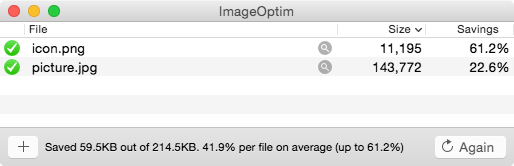
Google’s PageSpeed Insights is a practical place to start because it shows how a page performs on desktop and mobile and points to the largest bottlenecks. If image weight is part of the issue, a compression workflow helps. The second screenshot below shows an image optimization tool in use, which is the kind of unglamorous step that often pays for itself quickly.
If the site also needs a basic accessibility review, the W3C introduction to web accessibility is worth reading. Accessible structure and SEO are not identical, but they overlap in the places that matter most: headings, labels, readable content, and a page that can be understood without guesswork.
7. Measure the recovery with Search Console and Analytics, not memory
Restoration work feels better when the site looks clean, but feelings are not a measurement system. I want to know whether the site is receiving impressions, clicks, and engaged visits after the repair. That means using Search Console and Analytics together. Search Console shows search presence. Analytics shows what visitors did after arriving.
The Google Analytics setup guide is the baseline reference if the property still needs to be configured. Once the data is flowing, compare the rebuilt pages against the old baseline where possible. If a page lost traffic after restoration, look for the reason. If it gained traffic, confirm that the gain is coming from the right pages and queries.
Measurement rule: do not judge the site from one day of data. Look for direction over time. A restored site often needs a few weeks of clean signals before the pattern becomes clear.
Two practical monitoring examples
I like to keep this section grounded because SEO advice becomes useless when it stays abstract. Here are two ordinary scenarios I would expect to see on a restored site.
Example 1: A service page comes back, but traffic stays flat
First, I check whether the page is indexable and linked from somewhere meaningful. Then I compare the title tag, H1, and body copy against the page’s actual purpose. If Search Console shows impressions but no clicks, the title and description may need work. If Search Console shows nothing, the problem is probably technical instead of editorial.
Example 2: A blog article loads slowly on mobile
In that case, I check the image weight first, then the script load, then the layout. A slow page can still rank, but it often underperforms because users leave before the page finishes settling. PageSpeed Insights helps identify the weakest part of the page so the fix is not just a guess with a confidence problem.
Common mistakes to avoid
Restored sites usually fail in predictable ways. The good news is that most of those failures are avoidable if you inspect them early and with a little suspicion.
| Mistake | What it looks like | Why it hurts SEO |
|---|---|---|
| Leaving noindex or blocked crawl settings in place | Pages are visible to humans but hidden from search engines | The page cannot rank if it cannot be indexed |
| Changing URLs without redirects | Old links now hit 404 pages | Backlink value and user trust both erode |
| Reusing stale titles and meta descriptions | Search snippets still describe the old site or the wrong topic | Click-through rates and relevance suffer |
| Ignoring mobile layout problems | Forms, menus, and images break on smaller screens | Users leave quickly and search systems notice the poor experience |
| Leaving broken internal links behind | Menus or body links point to deleted pages | Signal flow inside the site becomes weak and confusing |
| Publishing thin “we are back” content | Pages announce the restoration instead of helping the reader | Search visibility depends on usefulness, not internal celebration |
| Measuring too early | One day of data is treated as a verdict | Short-term noise hides the actual trend |
Here is the short checklist I use when I want to catch the biggest failures fast:
- Confirm the important pages are indexable.
- Check redirects for old URLs.
- Review titles, headings, and meta descriptions.
- Inspect internal links from the homepage and service pages.
- Test the mobile layout and image load time.
- Open Search Console and Analytics before making assumptions.
If you want the operational version of this work, it helps to think in priorities. First, prevent loss. Second, restore findability. Third, improve performance. Fourth, expand the content only after the foundation is stable. That order keeps SEO from becoming a guessing game.
How I would prioritize the work in the first week
When the site is freshly restored, I keep the first week tight and practical. There is too much risk in trying to fix everything at once.
- Day 1: verify sitemap, robots settings, and noindex status on the main pages.
- Day 2: check old URLs, restore redirects, and remove broken menu items.
- Day 3: rewrite titles, H1s, and meta descriptions on the highest-value pages.
- Day 4: review images, alt text, and page weight on the pages that matter most.
- Day 5: test mobile behavior, forms, and key conversion paths.
- Day 6: open Search Console and Analytics to watch early movement.
- Day 7: document what changed and what still needs attention.
This is not a magic formula. It is just a sensible order. The first week after restoration should tell you whether the site is visible, understandable, and worth sending visitors to.
Where the right tools fit in
Good SEO on a restored site depends on a small set of tools used consistently. Search Console shows whether search systems can see the site. Analytics shows what visitors do after arrival. PageSpeed Insights shows whether the page is too heavy or too unstable. A compression tool or image workflow keeps media from becoming the hidden drag on performance. A browser and a notepad still matter too. Sometimes the simplest test is opening the page like a stranger and noticing what feels off.
I would not start with a dozen subscriptions. I would start with the tools that expose the site’s real failure modes. The best tool is the one that gives you a useful answer before the problem turns into a guessing contest.
Conclusion
SEO for a restored website is not a separate discipline from restoration. It is part of the same job. If the site comes back without crawl paths, redirects, clear titles, internal links, image discipline, speed checks, and basic measurement, the rebuild is only half finished.
My rule is simple: restore what the site needs to be found, make the pages useful again, and verify the result with data instead of assumptions. That keeps the work calm and defensible. It also keeps the next repair smaller, which is the kind of outcome I prefer.
If the restored site still needs structure, content cleanup, or a more durable maintenance plan, the services page is the right next stop. Search visibility can recover, but it recovers best when the site is treated like a system that has to stay reliable after the relaunch.