A restored site is often most vulnerable right after it comes back online. The page layout may look finished, but security is a separate job. Old passwords may still exist. Unused plugins may still be active. A backup system may be missing or untested. That is why website security matters so much after restoration: it protects the work already done and gives the site a better chance of staying stable.
When people ask what to secure first, they are usually asking a practical set of questions: What can go wrong? Which controls matter most? How much protection is enough? What should I monitor after launch? Those are sensible questions, and the answer is usually less glamorous than people hope. Website security is mostly a discipline of reducing obvious risks before they become expensive problems. WordPress’s hardening guide and the OWASP Top 10 both point in the same direction: the biggest gains usually come from basic controls that are applied consistently.
For a restored website, security is not an abstract IT topic. It affects search visibility, trust, uptime, and whether visitors can actually use the site without interruption. A compromised login can lead to spam pages. A missed update can open the door to malware. A weak backup plan can turn a recoverable incident into a full rebuild. There is no useful point in pretending any site is invulnerable; the better standard is to make it difficult to abuse and easy to recover.
In this guide, I will define the main security terms, walk through the most common threats, show the most practical protections, and compare tools for ongoing monitoring. If you want a measured approach instead of security theater, start here and keep reading to the end.
What website security means
Website security is the set of controls, habits, and checks that reduce the chance that a site will be hacked, defaced, misused, or taken offline. It includes software updates, strong authentication, encryption, backups, monitoring, and response planning. In plain language, security is what keeps a website trustworthy when nobody is watching.
After restoration, the job gets more specific. A restored site may carry old settings forward, and some of those settings may be harmless while others may be risky. That is why the first review should focus on access, updates, backups, and the basic attack surface. If you want background on the organization behind this site, the About page is the place to start. It gives context for who owns the site and why it exists.
Security terms worth knowing
| Term | Plain definition | Why it matters after restoration |
|---|---|---|
| Malware | Software designed to damage, spy on, or misuse a site or device. | Can add spam pages, redirect visitors, or steal login data. |
| Phishing | Fake messages or sites that try to steal credentials. | Often targets administrators, not visitors. |
| DDoS attack | A flood of traffic intended to overwhelm a site. | Can make a restored site slow or unreachable. |
| SQL injection | A method of sending malicious database commands through a vulnerable form or query. | Can expose, change, or delete site data. |
| SSL/TLS | Encryption that protects data in transit between the browser and the site. | Helps keep logins and form submissions private. |
| MFA | Multi-factor authentication, which asks for a second proof of identity. | Makes stolen passwords less useful. |
| Firewall | A filter that helps block suspicious traffic before it reaches the site. | Reduces noise from bots and some attacks. |
| Backup | A separate copy of the site files and database. | Lets you recover faster if something goes wrong. |
Security improves when terms are defined clearly. If a team cannot explain the difference between encryption, authentication, and backup, it is usually not ready to make good tradeoffs yet. That is not a moral failing. It is just a sign that the work needs structure.
A simple decision rule
When you evaluate any security measure, use four criteria:
- Coverage: what risk does it actually reduce?
- Usability: will the people who manage the site actually keep using it?
- Recovery: if it fails, how quickly can you restore normal operation?
- Maintenance cost: what ongoing effort does it require?
This is a useful filter because not every tool that looks impressive is actually worth its price or complexity. The right answer is usually the one that lowers risk without becoming another thing to babysit.
Common threats to websites
Security discussions get more useful when they name the actual threats. Not every site faces the same risk level, but the major categories are stable enough to plan around. The goal is not to panic. The goal is to know what to watch for.
Malware and viruses
Malware is one of the most common problems after a compromised plugin, stolen password, or unsafe upload. It may hide in files, inject links into pages, or create new admin accounts. In many cases the site still looks normal to the owner, which is part of the problem. A healthy-looking site can still be quietly doing the wrong thing.
Warning signs include unfamiliar files, strange redirects, sudden performance problems, and warnings from browsers or search engines. If you suspect malware, isolate the site, change credentials, and compare the current files against a known-good backup. The important point is to treat recovery as a process, not as a lucky guess.
Phishing attacks
Phishing is usually aimed at people rather than code. The attacker sends a fake login prompt, support email, or account notice to trick an administrator into handing over credentials. Because restored sites often involve multiple people, the attack surface can include everyone with admin access, not just the person who built the site.
Good defenses are simple but boring: use MFA, confirm login pages through bookmarks rather than email links, and train anyone with access to spot suspicious requests. Boring is fine here. Boring prevents drama.
DDoS attacks
A distributed denial-of-service attack floods a site with traffic so it becomes slow or unavailable. The attack does not always need to be sophisticated. Sometimes it is just large enough to exhaust resources or trigger rate limits. Cloudflare’s DDoS overview is a useful reference because it explains how volume, bandwidth, and service disruption fit together.
For a restored site, the practical response is usually to place the site behind a firewall or content delivery network, keep the origin server protected, and monitor uptime so unusual behavior is noticed quickly. A site does not need to be famous to be bothered. Automation is not selective in a flattering way.
SQL injection
SQL injection happens when a vulnerable form or input field lets an attacker send database commands that were never meant to run. In older or poorly maintained systems, that can expose data or alter content. The risk is lower when software is updated and forms are handled by trusted components, but it never disappears entirely.
OWASP lists injection among the core web risks for a reason. The usual controls are well known: use current software, remove unused plugins, validate input, and rely on reputable code rather than custom shortcuts unless there is a clear reason to do otherwise.
Threats at a glance
| Threat | Typical sign | First response |
|---|---|---|
| Malware | Unexpected redirects, unknown files, spam links | Isolate the site and compare against a clean backup |
| Phishing | Fake login page or urgent email request | Verify the request through a known channel |
| DDoS | Slow loading or repeated outages | Check traffic filtering and uptime monitoring |
| SQL injection | Unexpected database errors or altered content | Patch the vulnerable component and review logs |
The useful question is not whether these threats exist. They do. The useful question is which of them the site is most likely to face given its software, traffic patterns, and access model.
Best practices for security
Security works best when it is layered. No single control solves everything, and that is fine. The point is to create enough friction that common attacks fail quickly while normal administration remains manageable.
1. Keep software updated
Updates are often the highest-value security step because they close known holes before attackers can use them. That includes the CMS core, plugins, themes, server packages, and any third-party services that connect to the site. If an update process feels tedious, that is usually a sign that the process needs ownership, not that updates are optional.
A practical rule is to review critical updates weekly and install them on a schedule rather than waiting for a problem. For low-risk changes, a short maintenance window is enough. For larger changes, test first. Speed matters, but reliability matters more.
2. Use strong password policies and MFA
Passwords are still common failure points because people reuse them and attackers know it. Strong password policies should require unique passwords for every admin account, plus multi-factor authentication wherever possible. If a password leaks, MFA makes the leak much less useful.
For teams, this means fewer shared logins and more individual accounts. Accountability matters. So does revocation. If someone leaves the project, remove access immediately instead of at some undefined future date that never arrives.
3. Encrypt traffic with SSL/TLS
An SSL/TLS certificate protects data while it travels between the browser and the site. It does not fix every problem, but it does prevent a plain-text connection from exposing logins and form submissions. If a restored site still lacks HTTPS, that is usually the first visible gap to close.
Let’s Encrypt is a practical place to start because it makes certificate issuance more accessible for many sites. The certificate itself is not the entire security strategy. It is one layer, and a necessary one.
4. Keep backups separate and test them
Backups are the difference between an incident and a disaster. A backup that has never been tested is a promise, not a solution. At minimum, keep one off-site copy, automate the schedule, and verify that restore steps actually work. Recovery speed matters as much as backup frequency.
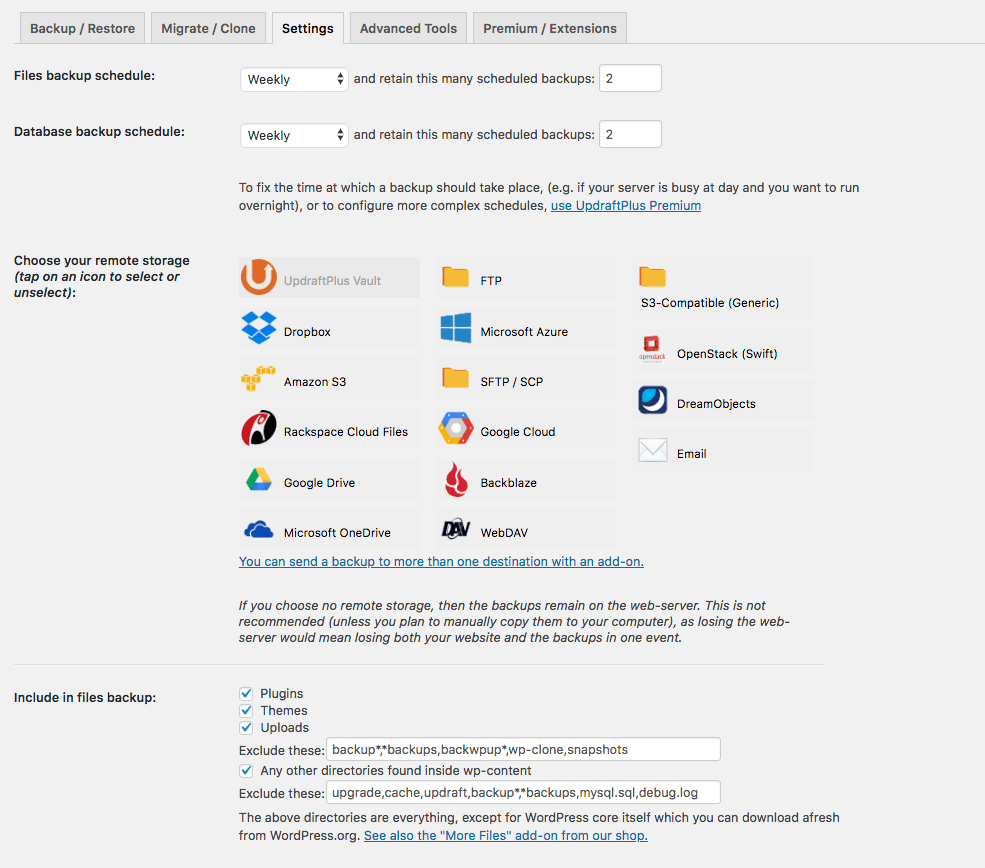
If you want to compare backup options with a broader planning lens, the safest reasonable default is the one that gives you an off-site copy, an easy restore path, and a routine you will actually maintain. Fancy systems that nobody checks are decorative, and decorative is not the goal.
5. Remove what you do not use
Unused plugins, themes, accounts, and integrations increase the attack surface. A restored site should be trimmed down to the parts that are still needed. That includes old admin accounts, abandoned form tools, and any code that was left behind because nobody wanted to touch it during the rebuild.
Unused software is not harmless simply because it is inactive. If it can be reached, it can become part of an attack path. Keep the site small enough to understand.
6. Apply least privilege
Not everyone needs admin access. Most people need a role that lets them do their job without being able to rewrite the whole site. Least privilege means giving each user only the access they need, and no more. It is one of the simplest controls in security, and one of the most neglected.
That principle also applies to integrations and API keys. If a tool only needs read access, do not hand it write access because it is convenient. Convenience is how many bad habits start.
7. Protect forms and uploads
Contact forms, file uploads, and comment areas are common entry points. Use reputable form plugins, limit upload types, and review the settings instead of assuming the defaults are wise. If the site does not need comments, disable them. If a form is not needed, remove it. Every public input field deserves scrutiny.
For a restored site, this is a common place where old behavior lingers. It is worth checking whether the current public experience still matches the current business need.
A practical security checklist
| Priority | Action | Reasonable default | Caveat |
|---|---|---|---|
| High | Update core, themes, and plugins | Weekly review, urgent patches faster | Test major changes before broad rollout |
| High | Turn on MFA for all admin accounts | Use a second factor for every login | Keep recovery codes in a safe place |
| High | Maintain off-site backups | Automated daily backup with restore testing | A backup that cannot be restored is incomplete |
| Medium | Clean up unused accounts and plugins | Remove anything no longer needed | Check dependency before deleting |
| Medium | Use HTTPS everywhere | Keep the site on SSL/TLS | Encryption is necessary, not sufficient |
| Medium | Protect forms and uploads | Limit input, review permissions, monitor logs | Attackers look for quiet entry points |
Tools for monitoring security
Monitoring tools help you catch issues early. They do not replace good habits, but they make it more likely that a problem will be noticed before it grows. The best fit depends on the platform, the budget, and how much time the team has to respond.
Security plugins
Security plugins can handle login protection, file scanning, alerts, and hardening advice. Examples include Wordfence and Sucuri. A reasonable selection criterion is whether the plugin gives clear alerts without overwhelming the team with false positives. If alerts are noisy, they stop being useful very quickly.
Monitoring services
Uptime and change monitoring services watch for downtime or unexpected site changes. They are especially helpful after restoration because they reveal whether the site stays healthy over time. The best tools are the ones that make abnormal behavior obvious without requiring constant manual checks.
Firewall options
A web application firewall can filter suspicious requests before they reach the site. Cloud-based firewalls are often easier to maintain because they sit in front of the origin server. That makes them a practical fit for sites that want defense without adding too much server-side complexity.
Regular security audits
Audits are less dramatic than alerts, but they are often more valuable. A monthly or quarterly review should ask whether plugins are current, whether new accounts are justified, whether backups are working, and whether logs show anything unusual. A short audit catches more than a long assumption.
If you want an extra reference point for vulnerability research, the WPScan project is widely used in the WordPress ecosystem. It is useful for understanding known risks, especially when a site depends on multiple plugins and themes. The point is not to collect tools for their own sake. The point is to pick a small set that helps you act quickly.
How to choose among tools
| Decision criterion | What to look for | Why it matters |
|---|---|---|
| Alert quality | Clear notices with useful detail | Reduces missed incidents and false alarms |
| Ease of response | Simple steps for locking down or restoring the site | Saves time when something breaks |
| Coverage | Protection for logins, files, traffic, and backups | Security gaps tend to appear between tools |
| Maintenance burden | Low overhead and manageable settings | A tool that is too hard to manage will drift |
| Cost | Pricing that fits the site’s size and risk | Expensive is not the same as appropriate |
For a restored site, the best monitoring setup is usually modest rather than elaborate. Start with one security plugin, one uptime or change monitor, one backup system, and one person who knows how to respond. More tools can help, but only if someone owns the output.
What a sane security routine looks like
A routine matters more than a one-time cleanup. Here is a simple cadence that works for many restored sites:
- Daily: confirm backups and watch for downtime alerts.
- Weekly: review updates, security notifications, and account activity.
- Monthly: audit plugins, themes, user roles, and logs.
- Quarterly: test a restore, review passwords, and check firewall rules.
That schedule is not magic. It is just disciplined enough to catch the common failures without becoming a second job. If the site is small, the routine can be simpler. If the site is mission-critical, it should be stricter.
There is also a governance question here. Someone has to own each part of the routine. If nobody owns it, it will not stay current for long. The site can survive a lot of noise; it does not survive neglect quite as gracefully.
Conclusion
Website security after restoration is about reducing avoidable risk and making recovery easy when something goes wrong. The main threats are familiar: malware, phishing, DDoS, and injection attacks. The main defenses are also familiar: keep software updated, use strong authentication, encrypt traffic, maintain backups, remove unnecessary access, and monitor the site with tools that generate useful alerts.
If you want the most practical starting point, focus on the reasonable default rather than the perfect setup. Turn on MFA. Verify backups. Update the core software. Trim unused plugins. Put the site behind a firewall or security service if the risk justifies it. Then review the results on a schedule. Security is not a one-time fix. It is a steady habit, and the site is better for it.
- Define the risks before choosing the tools.
- Use layered protection instead of one silver bullet.
- Test backups and restores, not just the backup button.
- Monitor logs, updates, and access over time.
- Assign ownership so the routine survives after launch.